









Tips for Creating an Inviting and Functional Home Workspace
Creating a home workspace that is both inviting and functional is essential for anyone who spends time working from home. A well-designed area can boost productivity, reduce stress, and create the right mindset for focus. Whether you have a dedicated room or just a small corner, these tips will help you transform your space into a comfortable and efficient work zone.
Choose the Right Location
Consider Natural Light
Natural light is one of the most important elements for any workspace. Position your desk near a window if possible. Daylight helps reduce eye strain and encourages positivity and alertness.
Think About Noise Levels
Select a quiet spot away from household distractions like the kitchen or living room TV. If this isn’t possible, consider noise-cancelling headphones or adding soft furnishings to absorb sound.
Check for Electrical Outlets
Ensure your workspace is near enough to plug in your computer, lamp, phone charger, and other devices. You don’t want cables stretching across the room or an overreliance on extension leads.
Invest in Comfortable and Supportive Furniture
Choose an Ergonomic Chair
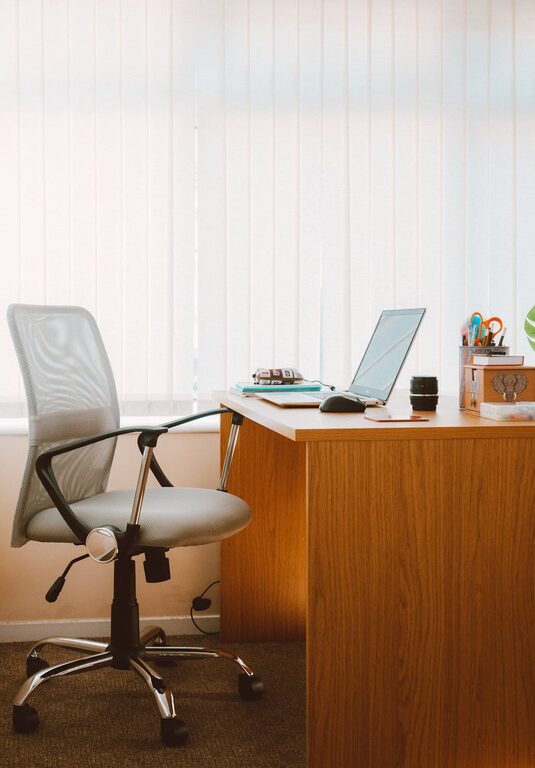
Spending hours sitting requires a chair that supports your back properly. Look for adjustable height, lumbar support, and padded seating. Comfort can prevent aches and improve concentration.
Opt for a Spacious Desk
Your desk should have enough surface area for your computer, notebooks, and any other work materials. If space is limited, a fold-down or wall-mounted desk can be a smart solution.
Add Footrests or Anti-Fatigue Mats
For better circulation and to reduce fatigue, consider a footrest or anti-fatigue mat if you stand at your desk sometimes.
Keep Your Space Organised
Use Storage Solutions
Clutter can be distracting, so keep everything tidy with shelves, drawers, or boxes. Label storage containers to find things quickly.
Cable Management
Use clips, ties, or cable boxes to keep cords neat and out of sight. This prevents tangles and creates a clean aesthetic.
Prioritise Essential Tools
Only keep items you use daily on your desk to avoid clutter. Store or remove unnecessary items to maintain a clear work surface.
Personalise Your Workspace
Add Inspiring Decor
Include artwork, plants, or meaningful items to make the space welcoming. Plants, in particular, improve air quality and add a calming touch.
Choose Soothing Colours
Use soft, neutral colours like pale blues, greens, or greys that promote calmness. Avoid overly bright or distracting wallpapers.
Include Comfortable Accessories
A soft cushion for your chair, a warm throw, or a favourite mug can add a cosy feeling to your work area.
Optimise Lighting
Layer Your Lighting
Combine ambient, task, and accent lighting for a well-lit space. A desk lamp with adjustable brightness helps when working late or on cloudy days.
Avoid Glare
Position monitors to prevent glare from windows or lights. Anti-glare screen protectors or blinds can also help reduce eye strain.
Maintain Good Air Quality and Temperature
Ventilate Regularly
Fresh air keeps you alert and improves focus. Open windows when possible or use an air purifier to keep the air fresh, particularly in smaller rooms.
Control Temperature
Make sure the area is neither too hot nor too cold. A small fan or heater can be useful to maintain a comfortable temperature year-round.
Create a Routine to Separate Work and Home Life
Set Clear Boundaries
Having a dedicated workspace helps signal when it’s time to work and when to relax. Try to work only in your designated area to mentally separate work and leisure.
Declutter at the End of Each Day
Taking a few minutes to tidy your desk at the end of the day helps create a fresh start each morning, reducing stress and distraction.
Use Schedules and Reminders
Keep track of tasks and take regular breaks with apps or alarms to maintain balance and encourage movement.
Use Technology Wisely
Reliable Internet Connection
Ensure your internet speed and stability meet your work demands. Consider a wired connection for better reliability if necessary.
Invest in Quality Equipment
A good keyboard, mouse, webcam, and headset can improve comfort and communication during remote meetings.
Backup Your Work
Set up automatic backups to cloud storage or external drives to prevent data loss.
—
By focusing on comfort, organisation, and personal touches, you can create a home workspace that’s both welcoming and productive. Remember, small changes can make a huge difference in how you feel and work throughout the day. Whether you’re freelancing, studying, or taking part in virtual meetings, a well-planned home workspace is a valuable investment for your wellbeing and efficiency.